إسأل مهندس الحاسوب الآن

المهندسة خلود المجدلاوي
مهندس الحاسوب
الأسئلة المجابة 38559 | نسبة الرضا 97.8%
إجابة الخبير: المهندسة خلود المجدلاوي
المهندسة خلود المجدلاوي
مهندس الحاسوب
الأسئلة المجابة 38559 | نسبة الرضا 97.9%
Step 1. Open facebook.com from your computer or laptop using your default internet browser.
Step 2. Click on "Forgot Password" located under the login field.
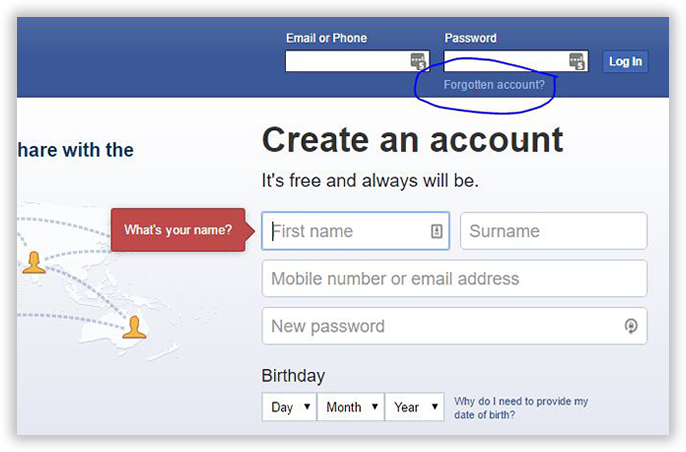
Step 3. If you have failed to login multiple times then you should seeing the following screen and from there you can click on "Forgot Password" as well.

If you want to reset and setup a new password for your Facebook account then you must apply the following steps and you should be able to set a new password for your account. The procedure is same as above but with just few different tweaks.
Step 1. Follow step 1-3 from the above method and on the password retrieval options choose "Email me a link to reset my password" and click on continue.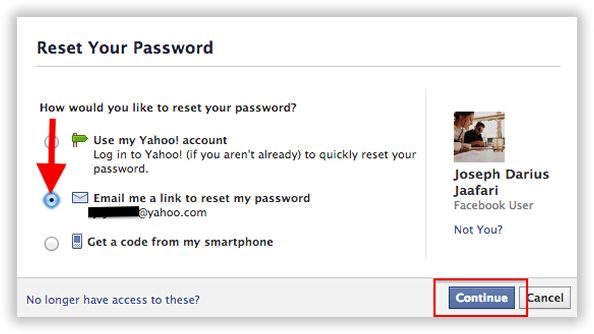
Step 2. Facebook will email you a special 6 digit code in your recovery that you will be asked to enter on the following page.
Step 3. Enter the code and click on "Change Password".
Step 4. Now enter a new password and confirm the changes.
That’s all. You may now login to you Facebook using the new password. This method is highly recommended if your Facebook account is hacked so that you can have a new password for your Facebook account.
If you have linked a phone number with your Facebook account then choose the third option from the "forgot password" page where it says "Get a code from my smartphone" and continue with the process.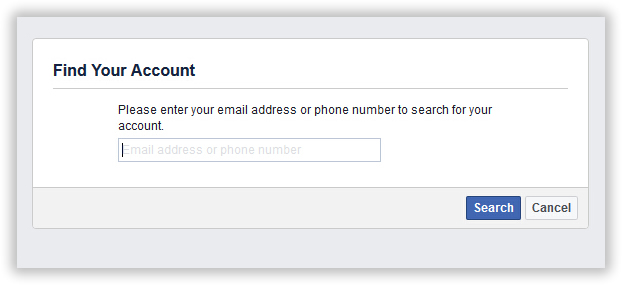
In this case, you will receive a security code on your phone number instead of your email. After that repeat the same steps as above mentioned method and you will have a new password for your Facebook account.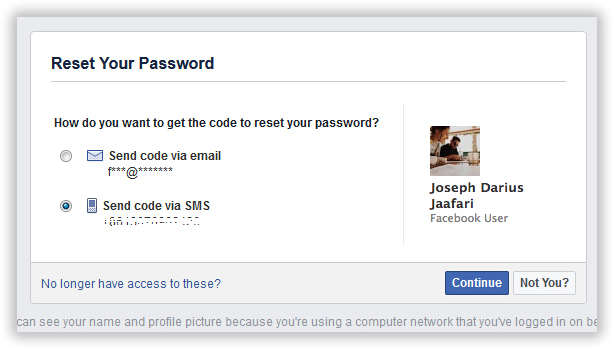
إسأل مهندس الحاسوب
المهندسة خلود المجدلاوي
مهندس الحاسوب
الأسئلة المجابة 38559 | نسبة الرضا 97.8%
- 100% ضمان الرضا
- انضم الى 8 مليون من العملاء الراضين

